10/1/11

Performance of Flask, Tornado, GEvent, and their combinations

When choosing a web framework, I pretty much have eyes set on Tornado. But I heard good things about Flask and Gevent. So I tested the performance of each and combinations of the three. I chose something just a little more advanced than a "Hello World" program to write - one that use templates. Here are the codes:

1, Pure Flask (pure_flask.py)
from flask import Flask, render_template
app = Flask(__name__)

@app.route('/')
def main_handler():
   return render_template('main_j2.html', messages="whatever",title="home")

if __name__ == '__main__':
   app.run(port=8888, debug=False)

2, Pure Tornado (pure_tornado.py)
import os.path
import tornado.httpserver
import tornado.ioloop
import tornado.web

class MainHandler(tornado.web.RequestHandler):
   def get(self):
      self.render('main.html', page_title="", body_id="", messages="whatever",title="home")

settings = {
   "static_path":os.path.join(os.path.dirname(__file__),'static'),
   "template_path":"templates",
}
application = tornado.web.Application([
   (r"/", MainHandler),
], **settings)

if __name__ == "__main__":
   application.listen(8888)
   tornado.ioloop.IOLoop.instance().start()

3, Flask with Gevent (gevent_flask.py)
from gevent.wsgi import WSGIServer
from pure_flask import app

http_server = WSGIServer(('', 8888), app)
http_server.serve_forever()

4, Flask with Tornado (tornado_flask.py)
from tornado.wsgi import WSGIContainer
from tornado.httpserver import HTTPServer
from tornado.ioloop import IOLoop
from pure_flask import app

http_server = HTTPServer(WSGIContainer(app))
http_server.listen(8888)
IOLoop.instance().start()

5, Tornado with Gevent (gevent_tornado.py)
import tornado.wsgi
import gevent.wsgi
import pure_tornado

application = tornado.wsgi.WSGIApplication([
   (r"/", pure_tornado.MainHandler),
],**pure_tornado.settings)

if __name__ == "__main__":
   server = gevent.wsgi.WSGIServer(('', 8888), application)
   server.serve_forever()


I have 3 template files: main.html, layout.html, and form.html. main.html "extends" layout.html and "includes" form.html. The total size of templates is about 30kB.
The reason Flask and Tornado use different templates (main.html and main_j2.html) is that their template syntax is slightly different. Flask (jinja2) template use "{% endblock %}", "{% endfor %}", etc. while Tornado just use "{% end %}".

I tested performance (requests per second) using ApacheBench:
ab -n 1000 -c 4 http://localhost:8888/
and run it 5 times. The testing is done on a 6-year old dual-Opteron 254 server.

Here are the results:
pure_flask: 82 88 107 102 71
pure_tornado: 144 244 241 294 290
gevent_flask: 127 139 145 152 110
tornado_flask: 110 88 74 92 101
gevent_tornado: 328 555 177 273 153

Here are the averages:
pure_flask: 90
pure_tornado: 242
gevent_flask: 135
tornado_flask: 93
gevent_tornado: 297


As you can see, the Tornado implementation is significantly faster than Flask. Gevent makes Tornado faster, but not by a lot.

In the end, I like the straight-forward style of Tornado and not the Flask way to write large project (using blueprints), So I sticks with Tornado.

3/29/11

bytearray error (an integer is required)

If you see this error: "TypeError: an integer is required" when you use bytearray, it means you can't use string for bytearray anymore.

Bytearray was introduced in python 3.0, it was back-ported to 2.6, in Python 2.6 and 3.0, you can use string:
#in 2.6 or 3.0

>>> a = bytearray()
>>> a.extend("hello")
>>> a
bytearray(b'hello')

But in Python 3.2, it won't work anymore, you have to use list of integers:

>>> a = bytearray()
>>> a.extend("hello")
Traceback (most recent call last):
File "", line 1, in
TypeError: an integer is required
>>> a.extend(b'hello') #this is OK
#if you have to use a string, use str.encode()
>>> a.extend("hello".encode()) # or list(map(ord,"hello")) or [ord(e) for e in "hello"]

3/28/11

Command line IDN punycode convertor

If you need a command line punycode converter for IDN (internationalized domain name), just write a small Perl program using Net-LibIDN(cpan).

On Fedora, do a "yum install perl-Net-LibIDN" to install Net-LibIDN.

To encode:
$cat en-puny.pl
#!/bin/env perl
use Net::LibIDN ':all';
print idn_to_ascii($ARGV[0],'utf-8') . "\n";

To decode:
$cat de-puny.pl
#!/bin/env perl
use Net::LibIDN ':all';
print idn_to_unicode($ARGV[0],'utf-8') . "\n";

Examples:
$./en-puny.pl 你我.中国
xn--6qqp96b.xn--fiqs8s

./de-puny.pl xn--6qqp96b.xn--fiqs8s
你我.中国

$./en-puny.pl ˆ.net
xn--wqa.net

To get punycode without "xn--" prefix, replace idn_to_ascii with idn_punycode_encode, and replace idn_to_unicode with idn_punycode_decode.

2/17/11

Touch: PHP vs Linux

Linux's touch (in coreutils) opens and closes the file.
PHP's touch uses the 'utime' system call to change access/modify time of the file inode.

I was using inotify to watch a file and was surprised to find when PHP 'touch'es the file, nothing happened. After some digging I found the two 'touch'es are different.

8/20/10

Enable chinese IDN .中国 (.xn--fiqs8s) in browsers

(Note this is for English browsers. You don't need to do this in localized browsers.)

Chinese IDN .中国 (puny: .xn--fiqs8s) is live since 8/15. Internet Explorer and Safari (tried on my iphone) support it natively. But in non-localized Firefox and Chrome, it display Punycode instead of unicode characters.

For example, the domain http://你我他。中国 will be displayed as http://xn--8mqxmp29b.xn--fiqs8s/ in Firefox and Chrome.

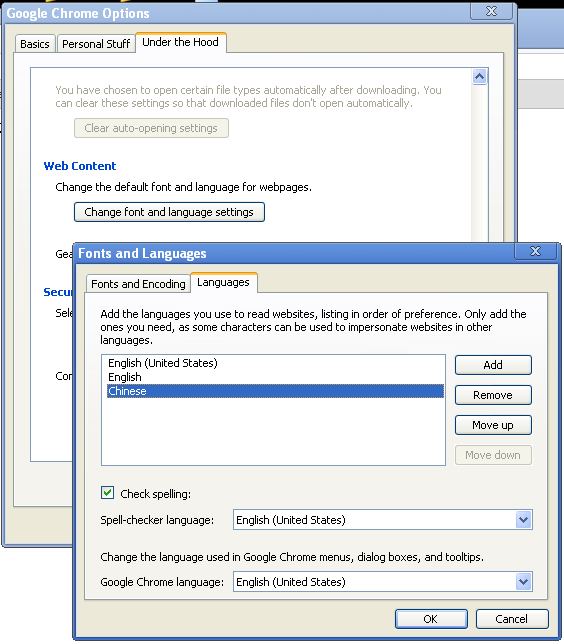
To fix it, do this in Chrome: In Tools(the wrench)->Options->Under the Hood tab, under "Web Content", click "Change Font and Language settings" button, then select "Languages" tab, click the Add button to add the language Chinese.


For Firefox, someone already filed a bug report, so hopefully it will be fixed in future release soon. But for now, we need to add the Chinese IDN to the whitelist. Type "about:config" in the address bar, click "I'll be careful, I promise!" button, right click, select New->Boolean, enter "network.IDN.whitelist.xn--fiqs8s", click OK, then select "true".

Now you can type Chinese IDN domain name in the address bar, it will be displayed as is and will not be converted to Punycode. In fact, if you type punycode, it will be convert back to IDN.

5/16/10

Creating ooxml word docx file with python and XSLT

The idea is taking an existing Word document, making it a template, and using it with external data to create a new Word document.

If you're dealing with 'doc' file (word2003 and before), you can use Pywin32. There are good information in the Chapter 10 of "Python Programming on Win32" book, in a section called "Automating Word".
But 'doc' file is on the way out. Staring from version 2007, Word is using the new 'docx' format. The good news is that 'docx' use OOXML (Office Open XML), an open industry standard. This means we can, in theory anyway, create Word DOCX file without using Windows. In practice, there's currently no good library that facilitate creating a docx file from xml data from scratch. It's tedious to do so without a good library. Hopefully someone will create one soon.

A short-cut exists though, i.e. create a template docx, create XSLT from it, then use XSLT to transform xml data into a new docx file.

Here's a post that describes this process using CSharp. My code is based on ideas and codes in this post.

Here's how to do it in Python (using the excellent lxml module):

1, Create a template docx file
Just create a regular docx file with Word (example.docx)

2, Create xslt file from docx file.
A docx file is a zip file. You can get "word/document.xml" file by unzip the docx file. But the resulting file has no line breaks. It's very hard to edit it using regular text editor like VIM. (you can use xml editor, but there ain't good one that's free). I have a python program that does this (getxslt.py). All it does is getting 'word/document.xml', prettifying it(adding linebreaks), and adding XSLT header and footer.
We need to use the docx file later, but without 'word/document.xml' file (python's zipfile module can't do file replacement in zip). You can achieve this by "open archive" the docx file with '7-zip' on windows, then delete 'word/document.xml'.

3, Modify xslt file.
Determine where you need to change the data, add things like:
<xsl:value-of select="..."/>
and
<xsl:for-each select="...">
...
</xsl:for-each>
You need to study a little bit xslt to do this, it's not too hard.

4, Do XSLT transform to convert xml data to 'word/document.xml' and add it to new docx file.
import shutil
import zipfile
from lxml import etree

xsl = etree.XSLT(etree.parse("xslt1.xml"))
xml = etree.parse("cddata.xml")
newxml=xsl(xml)

#nodocxml.docx is original docx file without word\document.xml
shutil.copyfile("nodocxml.docx","mycds.docx")

mycds = zipfile.ZipFile("mycds.docx",'a',zipfile.ZIP_DEFLATED)
mycds.writestr('word/document.xml',str(newxml))
mycds.close()

explanation:
'xslt1.xml' is the modified xslt file from the step 3;
'cddata.xml' is xml data file (source: w3schools xslt tutorial );
newxml is the result xml tree of xslt transformation;
'nodocxml.docx' is the same as example.docx, the original docx file, except it doesn't have 'word/document.xml';
'mycds.docx' is our final product.

The example files can be downloaded from here: http://bitbucket.org/wensheng/pydocx/downloads/pydocxml.zip

The example does very few transformation. If you want to more advanced stuff like adding images, you have to be more familiar with OOXML. (Add image to media directory, change relationships xml file, add relationship anchor to document.xml etc.)

4/13/10

Getting back data from lvm on raid1 on a single disk

One of my servers died. The only thing I have left is a hard-drive from that server. But I have important data I need to recover from this disk.

The disk was part of RAID1 (software-raid) disks. It's not boot-able, and only contains LVM volumes.

Here's how I get my data back:

1, Connect the hard-drive to my PC. I used a USB docking station.

2, My OS (Fedora) assigned it to /dev/sdd. It can not mount it since it's raid.

3, make raid node, and attach the partition
mknod /dev/md0 b 9 3
mdadm --create /dev/md0 --level=raid1 --name=0 --auto=md --raid-disks=1 -f /dev/sdd1
"-f" switch is needed to force creating raid1 with only 1 disk.

4, now if I do pvscan, vgscan, and lvscan, it shows my vg (vg1) and lvm's:
pvscan #it shows PV /dev/md0 VG vg1
but I still can not mount them, because no volume group actually existed. Do this:
vgchange -a y vg1
Now /dev/vg1 is activated.

5, Do the mount as usual
mount /dev/vg1/wensheng /mnt

After I got back all my data, I disassemble the hard-drive to get the magnets, and throw the rest to trash. Why? because of this:

from my experience, this drive will die soon anyway.

11/26/09

IGot24 - a javascript game for calculate 24, hosted on AppEngine

I wrote a small game in the last few days. The game is called IGot24.
The idea is to use 4 basic arithmetic operations to get result 24 from 4 randomly drawn cards. I talked about the algorithm and python implementation in an old post. In fact, it's currently the first result on Google for "calculate 24".

The game is at:
http://calculate24.appspot.com/

I first wrote the game using pure JavaScript. Later I thought whoever play it may want to get solutions. So I created the backend with Google AppEngine that supply cards and solutions. Then I added a few more options, like getting only solvable cards, disabling timer, calculate 42 instead of 24, etc.

The heart of the JavaScript code is a finite state machine. At first I just coded away thinking it'll be simple, then gradually realized there're more states. I then drew a state diagram and found out there were 21 states! They are all branches, there's no loopback, so I don't think they can be optimized. (Maybe they can, but I don't want to re-read my circuit design book from ages ago to find out)

I think the game can be easily re-done in flash using Flex, since JavaScript can be ported to AS3. It can be ported to IPhone too but it will be waste of time and money (to buy a mac to do iphone dev) because I found a "calculating 24" iphone app got downloaded a whopping 12 times.

11/21/09

Chrome OS on Xen HVM

Google announced open-source Chromium OS 2 days ago. today I tried to build it on a Ubuntu virtual machine. But I failed, had numerous problems I won't elaborate. I will try again sometime later.

I searched web and found a VMWare virtual disk of ChromeOS here. So I downloaded it.

Not wanting to install VMWare, I converted it to a raw disk image and loaded it to XEN with HVM, it worked. But it basically unusable for me mainly because of mouse movement was too slow. I will try with a different vnc client later to see if it improves.

Here's how to convert vmdk image to raw:
$qemu-img convert -f vmdk chrome-os-0.4.22.8-gdgt.vmdk -O raw chrome-os.img

Then just specify the image file in 'disk' line of domain config file, like:
disk = [ 'file:/root/chrome-os.img,hda,w' ]

Here's screenshot of chrome OS:


Here's chrome OS login screen, I have a Fedora 12 hvm domain and a Ubuntu 9.04 32bit domainU also running on this machine. The domain0 itself is Fedora 12 64bit with pvops kernel 2.6.31.6.

I had to use standard VGA driver(stdvga=1), the default Cirrus Logic driver give me a screen like this after I login:

10/27/09

POC: online barcode qrcode scan with webcam

This is proof of concept(POC). The idea is to scan rebates, coupons, tickets etc. in the forms of barcode and qr-code using your web-cam.

Such an idea is really nothing new. With cellphone, you can now scan the barcode when you pick up an item in store, and get price information on whether it is cheaper at nearby stores or online. Also barcodes on cellphone can now be used for mobile ticketing.

But I have not heard a lot about scanning rebates/coupons/tickets with webcam online. So I created this POC project.
Screenshot:


It somewhat works. QR-code works consistently but most of times the program can not read UPC and code 128. I am sure with some added backend photo processing, I can improve the result, but I doubt it will help a lot. Two of my 3 webcams have a focal length that make it impossible to snap a clear code image, unless of course the image is real large like 400x400 or 500x500px. So I guesstimate most webcams are not suited code scanning?

Here's actual page in a iframe:


The frontend is build with Flex SDK. The webcam code come straight from here.
The backend is using Zxing.
The QRcode test sample is generated from here with google chart api.