Just found out the old homepage I had at UTEP still exists in archive.org.
Here're 2 awesome animated gif I pulled from there. Hard to believe I made them in 1997, 15 years ago!
gif1
gif2
The first one run animation 2 times then stop. The 2nd has a transparent background. I don't even know how to make them today without googling around.
3/19/12


2/21/12
Lyrics Scroller App
I attended AT&T Mobile App Hackathon in Plano last weekend. I made an iPhone app in less than 24 hours! It's a app that display lyrics while playing a song, it highlight the sentence that's being played, kind of like Karaoke. It's more of a proof of concept prototype. But I will continue working on it and will submit it to App Store. I will also make an Android version.
Here's video demo: (Sorry for the poor video quality. In shooting of this video, the camera went out-of-focus, I tried to manually adjust but that made it worse.)
Here's video demo: (Sorry for the poor video quality. In shooting of this video, the camera went out-of-focus, I tried to manually adjust but that made it worse.)
1/31/12
Compile Objective C 2.0 (objc 2) on Linux
If you have gcc >4.6 (type 'gcc --version' to check your version), you can use gcc, otherwise use clang(llvm).
On Fedora, install dependencies:
To compile:
@property @synthesize works. Blocks also work.
On Ubuntu, install dependencies:
Not all language features are possible on linux, for example @autoreleasepool {} works on neither Fedora nor Ubuntu.
On Fedora, install dependencies:
yum install gcc-objc libobjc gnustep-base-devel gnustep-gui-develIf you want to use llvm, do a "yum install clang"
To compile:
gcc `gnustep-config --objc-flags` `gnustep-config --objc-libs` -lgnustep-base helloworld.m -o helloworldYou have to use clang instead of gcc if you want to use blocks and you have to add '-fblocks' flag.
@property @synthesize works. Blocks also work.
On Ubuntu, install dependencies:
sudo apt-get install gobjc libobjc2 lib32objc2 libgnustep gnustep-base gnustep-devel clangTo compile:
sudo ln -s /usr/lib/gcc/x86_64-linux-gnu/4.4/include/objc/ /usr/local/include/objc
clang `gnustep-config --objc-flags` `gnustep-config --objc-libs` -lgnustep-base helloworld.m -o helloworldOn my machine (running Ubuntu 10.04), because gcc version is 4.4, I have to use clang. I also couldn't get blocks to work.
Not all language features are possible on linux, for example @autoreleasepool {} works on neither Fedora nor Ubuntu.
1/18/12
Programming with Chinese 用中文编程
I just found out that I can now use Chinese in filename and as variable name in Visual studio 2010.

I know in Java and PHP you can do this for a long time. In Haskell, you can also do it. For example:

It will make some interesting programming now that Visual Studio also enables it.

I know in Java and PHP you can do this for a long time. In Haskell, you can also do it. For example:

It will make some interesting programming now that Visual Studio also enables it.
1/17/12
2012 Resolutions and other thoughts
7!
That's the number of blog posts I wrote in the last 2 years! Boy do I need to write more often! I will put "write more blogs" as one of my new year's resolutions. No, wait, it's already there. Although it's a bit late for new year's resolutions now that we are over half month into January, I actually had my resolutions written down earlier, in fact, much earlier - like, 5 years ago.
My 2012 new year's resolutions is the same as ones for 2007. Suffice to say I didn't accomplish any of those in 2007, nor 2008, nor, well, you get the idea.
So I won't publish the resolutions again, but they are usual stuffs like everybody else's: stay fit, learn Korean, learn Haskell, save more, spend less, launch X, launch Y, change the world, etc.
That's the number of blog posts I wrote in the last 2 years! Boy do I need to write more often! I will put "write more blogs" as one of my new year's resolutions. No, wait, it's already there. Although it's a bit late for new year's resolutions now that we are over half month into January, I actually had my resolutions written down earlier, in fact, much earlier - like, 5 years ago.
My 2012 new year's resolutions is the same as ones for 2007. Suffice to say I didn't accomplish any of those in 2007, nor 2008, nor, well, you get the idea.
So I won't publish the resolutions again, but they are usual stuffs like everybody else's: stay fit, learn Korean, learn Haskell, save more, spend less, launch X, launch Y, change the world, etc.
10/1/11
Performance of Flask, Tornado, GEvent, and their combinations
When choosing a web framework, I pretty much have eyes set on Tornado. But I heard good things about Flask and Gevent. So I tested the performance of each and combinations of the three. I chose something just a little more advanced than a "Hello World" program to write - one that use templates. Here are the codes:
1, Pure Flask (pure_flask.py)
2, Pure Tornado (pure_tornado.py)
3, Flask with Gevent (gevent_flask.py)
4, Flask with Tornado (tornado_flask.py)
5, Tornado with Gevent (gevent_tornado.py)
I have 3 template files: main.html, layout.html, and form.html. main.html "extends" layout.html and "includes" form.html. The total size of templates is about 30kB.
The reason Flask and Tornado use different templates (main.html and main_j2.html) is that their template syntax is slightly different. Flask (jinja2) template use "{% endblock %}", "{% endfor %}", etc. while Tornado just use "{% end %}".
I tested performance (requests per second) using ApacheBench:
Here are the results:
Here are the averages:
As you can see, the Tornado implementation is significantly faster than Flask. Gevent makes Tornado faster, but not by a lot.
In the end, I like the straight-forward style of Tornado and not the Flask way to write large project (using blueprints), So I sticks with Tornado.
1, Pure Flask (pure_flask.py)
from flask import Flask, render_template
app = Flask(__name__)
@app.route('/')
def main_handler():
return render_template('main_j2.html', messages="whatever",title="home")
if __name__ == '__main__':
app.run(port=8888, debug=False)
2, Pure Tornado (pure_tornado.py)
import os.path
import tornado.httpserver
import tornado.ioloop
import tornado.web
class MainHandler(tornado.web.RequestHandler):
def get(self):
self.render('main.html', page_title="", body_id="", messages="whatever",title="home")
settings = {
"static_path":os.path.join(os.path.dirname(__file__),'static'),
"template_path":"templates",
}
application = tornado.web.Application([
(r"/", MainHandler),
], **settings)
if __name__ == "__main__":
application.listen(8888)
tornado.ioloop.IOLoop.instance().start()
3, Flask with Gevent (gevent_flask.py)
from gevent.wsgi import WSGIServer
from pure_flask import app
http_server = WSGIServer(('', 8888), app)
http_server.serve_forever()
4, Flask with Tornado (tornado_flask.py)
from tornado.wsgi import WSGIContainer
from tornado.httpserver import HTTPServer
from tornado.ioloop import IOLoop
from pure_flask import app
http_server = HTTPServer(WSGIContainer(app))
http_server.listen(8888)
IOLoop.instance().start()
5, Tornado with Gevent (gevent_tornado.py)
import tornado.wsgi
import gevent.wsgi
import pure_tornado
application = tornado.wsgi.WSGIApplication([
(r"/", pure_tornado.MainHandler),
],**pure_tornado.settings)
if __name__ == "__main__":
server = gevent.wsgi.WSGIServer(('', 8888), application)
server.serve_forever()
I have 3 template files: main.html, layout.html, and form.html. main.html "extends" layout.html and "includes" form.html. The total size of templates is about 30kB.
The reason Flask and Tornado use different templates (main.html and main_j2.html) is that their template syntax is slightly different. Flask (jinja2) template use "{% endblock %}", "{% endfor %}", etc. while Tornado just use "{% end %}".
I tested performance (requests per second) using ApacheBench:
ab -n 1000 -c 4 http://localhost:8888/and run it 5 times. The testing is done on a 6-year old dual-Opteron 254 server.
Here are the results:
pure_flask: 82 88 107 102 71
pure_tornado: 144 244 241 294 290
gevent_flask: 127 139 145 152 110
tornado_flask: 110 88 74 92 101
gevent_tornado: 328 555 177 273 153
Here are the averages:
pure_flask: 90
pure_tornado: 242
gevent_flask: 135
tornado_flask: 93
gevent_tornado: 297
As you can see, the Tornado implementation is significantly faster than Flask. Gevent makes Tornado faster, but not by a lot.
In the end, I like the straight-forward style of Tornado and not the Flask way to write large project (using blueprints), So I sticks with Tornado.
3/29/11
bytearray error (an integer is required)
If you see this error: "TypeError: an integer is required" when you use bytearray, it means you can't use string for bytearray anymore.
Bytearray was introduced in python 3.0, it was back-ported to 2.6, in Python 2.6 and 3.0, you can use string:
#in 2.6 or 3.0
But in Python 3.2, it won't work anymore, you have to use list of integers:
Bytearray was introduced in python 3.0, it was back-ported to 2.6, in Python 2.6 and 3.0, you can use string:
#in 2.6 or 3.0
>>> a = bytearray()
>>> a.extend("hello")
>>> a
bytearray(b'hello')
But in Python 3.2, it won't work anymore, you have to use list of integers:
>>> a = bytearray()
>>> a.extend("hello")
Traceback (most recent call last):
File "", line 1, in
TypeError: an integer is required
>>> a.extend(b'hello') #this is OK
#if you have to use a string, use str.encode()
>>> a.extend("hello".encode()) # or list(map(ord,"hello")) or [ord(e) for e in "hello"]
3/28/11
Command line IDN punycode convertor
If you need a command line punycode converter for IDN (internationalized domain name), just write a small Perl program using Net-LibIDN(cpan).
On Fedora, do a "yum install perl-Net-LibIDN" to install Net-LibIDN.
To encode:
$cat en-puny.pl
#!/bin/env perl
use Net::LibIDN ':all';
print idn_to_ascii($ARGV[0],'utf-8') . "\n";
To decode:
$cat de-puny.pl
#!/bin/env perl
use Net::LibIDN ':all';
print idn_to_unicode($ARGV[0],'utf-8') . "\n";
Examples:
$./en-puny.pl 你我.中国
xn--6qqp96b.xn--fiqs8s
./de-puny.pl xn--6qqp96b.xn--fiqs8s
你我.中国
$./en-puny.pl ˆ.net
xn--wqa.net
To get punycode without "xn--" prefix, replace idn_to_ascii with idn_punycode_encode, and replace idn_to_unicode with idn_punycode_decode.
On Fedora, do a "yum install perl-Net-LibIDN" to install Net-LibIDN.
To encode:
$cat en-puny.pl
#!/bin/env perl
use Net::LibIDN ':all';
print idn_to_ascii($ARGV[0],'utf-8') . "\n";
To decode:
$cat de-puny.pl
#!/bin/env perl
use Net::LibIDN ':all';
print idn_to_unicode($ARGV[0],'utf-8') . "\n";
Examples:
$./en-puny.pl 你我.中国
xn--6qqp96b.xn--fiqs8s
./de-puny.pl xn--6qqp96b.xn--fiqs8s
你我.中国
$./en-puny.pl ˆ.net
xn--wqa.net
To get punycode without "xn--" prefix, replace idn_to_ascii with idn_punycode_encode, and replace idn_to_unicode with idn_punycode_decode.
2/17/11
Touch: PHP vs Linux
Linux's touch (in coreutils) opens and closes the file.
PHP's touch uses the 'utime' system call to change access/modify time of the file inode.
I was using inotify to watch a file and was surprised to find when PHP 'touch'es the file, nothing happened. After some digging I found the two 'touch'es are different.
PHP's touch uses the 'utime' system call to change access/modify time of the file inode.
I was using inotify to watch a file and was surprised to find when PHP 'touch'es the file, nothing happened. After some digging I found the two 'touch'es are different.
8/20/10
Enable chinese IDN .中国 (.xn--fiqs8s) in browsers
(Note this is for English browsers. You don't need to do this in localized browsers.)
Chinese IDN .中国 (puny: .xn--fiqs8s) is live since 8/15. Internet Explorer and Safari (tried on my iphone) support it natively. But in non-localized Firefox and Chrome, it display Punycode instead of unicode characters.
For example, the domain http://你我他。中国 will be displayed as http://xn--8mqxmp29b.xn--fiqs8s/ in Firefox and Chrome.
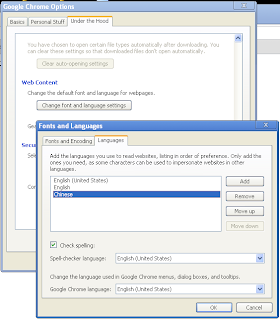
To fix it, do this in Chrome: In Tools(the wrench)->Options->Under the Hood tab, under "Web Content", click "Change Font and Language settings" button, then select "Languages" tab, click the Add button to add the language Chinese.
For Firefox, someone already filed a bug report, so hopefully it will be fixed in future release soon. But for now, we need to add the Chinese IDN to the whitelist. Type "about:config" in the address bar, click "I'll be careful, I promise!" button, right click, select New->Boolean, enter "network.IDN.whitelist.xn--fiqs8s", click OK, then select "true".
Now you can type Chinese IDN domain name in the address bar, it will be displayed as is and will not be converted to Punycode. In fact, if you type punycode, it will be convert back to IDN.
Chinese IDN .中国 (puny: .xn--fiqs8s) is live since 8/15. Internet Explorer and Safari (tried on my iphone) support it natively. But in non-localized Firefox and Chrome, it display Punycode instead of unicode characters.
For example, the domain http://你我他。中国 will be displayed as http://xn--8mqxmp29b.xn--fiqs8s/ in Firefox and Chrome.
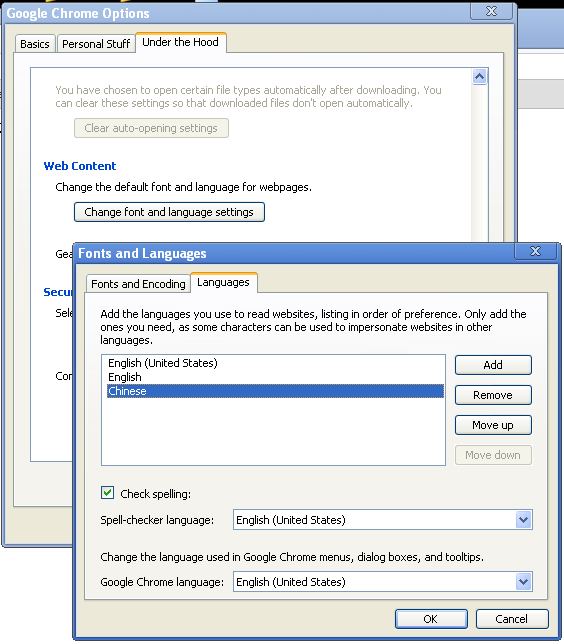
To fix it, do this in Chrome: In Tools(the wrench)->Options->Under the Hood tab, under "Web Content", click "Change Font and Language settings" button, then select "Languages" tab, click the Add button to add the language Chinese.
For Firefox, someone already filed a bug report, so hopefully it will be fixed in future release soon. But for now, we need to add the Chinese IDN to the whitelist. Type "about:config" in the address bar, click "I'll be careful, I promise!" button, right click, select New->Boolean, enter "network.IDN.whitelist.xn--fiqs8s", click OK, then select "true".
Now you can type Chinese IDN domain name in the address bar, it will be displayed as is and will not be converted to Punycode. In fact, if you type punycode, it will be convert back to IDN.
Subscribe to:
Posts (Atom)